A slow website is one of those problems that’s easy to overlook. The site works, it looks fine, and you’re used to it. But for someone visiting for the first time, every extra second of waiting shapes how they feel about your business. This article walks through what goes into making a website fast, why it matters, and how you can check your own site.
What goes into optimizing website speed?
Website speed comes down to a handful of layers: the quality of your hosting, the size of your images, how many add-ons and scripts your pages load, how well the site uses caching, and regular checks to keep it all in shape. Improving speed usually means working through each of these, measured with Google’s free PageSpeed Insights tool.
Why does website speed matter?
Think about walking into a clothing store that smells bad. The smell may have nothing to do with the quality of the clothes, but the experience is enough to put you off. A slow website works the same way. No matter how good your content or your services are, a page that drags creates a negative experience, and visitors connect that frustration with your brand.
Many people will simply leave and try the next result instead. That’s especially true for people browsing on their phones, often on a mobile connection, where a heavy page takes even longer to load.
Does website speed affect your Google rankings?
It plays a part, but it isn’t the most important part. Google says its ranking systems use Core Web Vitals, a set of measurements of how quickly and smoothly your pages load. But Google is also clear that it “always seeks to show the most relevant content, even if the page experience is sub-par.”
In other words, speed won’t make up for content that doesn’t answer what people are searching for. Where it helps most is when several pages are similarly relevant, and above all with the people who visit. A fast site is simply a better experience, and that supports everything else you’re doing.
How can you check your website’s speed?
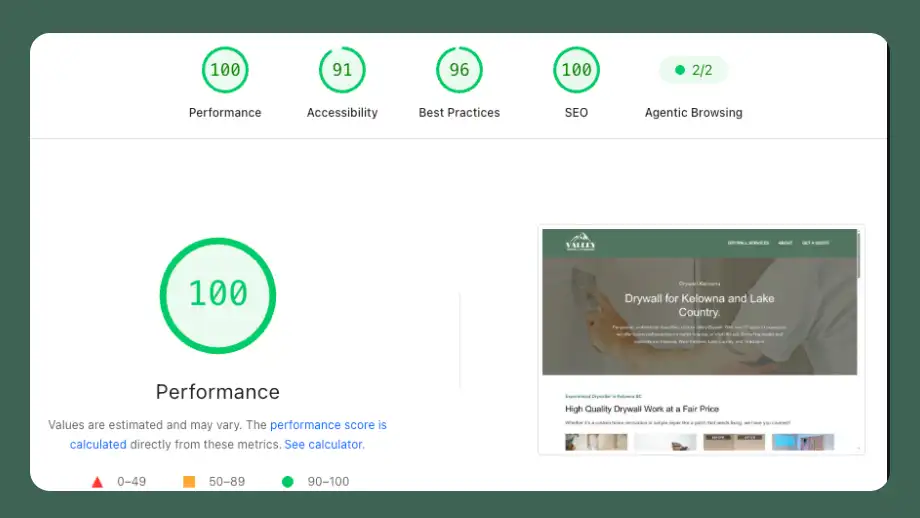
Google’s free PageSpeed Insights tool lets anyone test a page. Enter your web address and it shows how the page performs on phones and computers, including the three Core Web Vitals Google uses:
| Measurement | What it means | Google’s “good” target |
|---|---|---|
| Largest Contentful Paint (LCP) | How long the main content takes to appear | Within 2.5 seconds |
| Interaction to Next Paint (INP) | How quickly the page responds when someone taps or clicks | Under 200 milliseconds |
| Cumulative Layout Shift (CLS) | How much the page jumps around while it loads | A score under 0.1 |
Don’t be discouraged if your scores aren’t perfect. Google itself notes that chasing perfect scores just for SEO may not be the best use of your time. The goal is a site that feels fast to real visitors.
What usually slows a website down?
Most slow websites have the same few causes. Here’s what’s involved in each.
Hosting
Your hosting is the server your website lives on, and it has a bigger impact on speed than most people expect. As with many things, you tend to get what you pay for. There’s hosting that costs about as much as a cup of coffee each month, and hosting that costs many times more. Better hosting, especially hosting tuned specifically for the platform your site is built on, often includes speed tools and can make a site noticeably faster before anything else changes.
Images
Oversized images are one of the most common reasons a site loads slowly. A photo straight from a camera or phone can be enormous, and if it’s shown on the page at a fraction of that size, most of that data is downloaded for nothing. If an image appears at 200 by 200 pixels, there’s no reason for the file to be 5,000 by 5,000.
Optimizing images usually involves:
- Sizing each image close to how large it actually appears on the page
- Compressing files to make them smaller without a visible loss in quality
- Using modern formats, like WebP, that are lighter than older ones
- Loading only what’s needed on each device. On phones, that can mean serving smaller versions of large images, or leaving out a background image entirely when text covers most of it, which saves both the file and a request to the server.
Add-ons and scripts
Every extra feature a page loads adds weight: plugins, chat widgets, tracking codes, embedded videos, custom fonts. Each one may seem small, but together they can slow a page considerably. Part of speed work is reviewing what’s loading, removing what isn’t needed, and making sure the rest loads efficiently.
Caching
Caching means saving ready-made copies of your pages so they don’t have to be built from scratch for every visitor. It’s one of the most effective ways to speed up a site, and good hosting often includes it. Getting it set up correctly, so visitors see fast pages and your updates still show up, takes some care.
Ongoing checks
Speed isn’t a one-time fix. New photos, new plugins, software updates, and added features can all slow a site down again over time. Checking performance regularly keeps small problems from building up.
Each of these steps is manageable on its own, but together they take time and technical attention, and it’s easy for them to slip when you’re busy running a business. Keeping websites fast is part of the work I do for my clients every month as part of a Monthly Growth Plan, alongside everything else that helps a site bring in customers. If you’d like to talk about how your website is performing, let’s schedule a call.